Orders Table
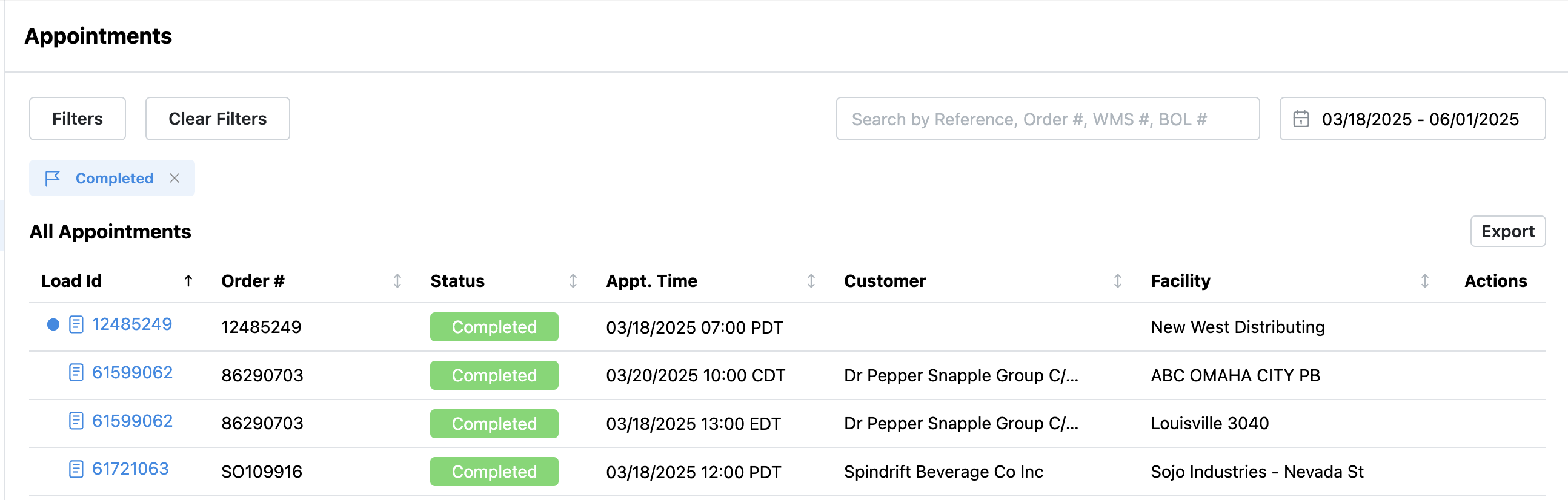
All orders can be found in this table. By default, it displays the past two weeks of data. You may adjust or remove the date filter to search further back.
Search & Filter: Use column filters or the search bar to find specific orders.
Export: Download appointment data as a CSV file for reporting or record-keeping.
Action Needed
To save time and streamline your workflow, prioritize actions on appointments that require attention. This eliminates the need to manually filter through the full appointment list.
Quick Actions
In the last column of the orders table, you can take quick actions—such as Reschedule or Cancel Appointment—without opening the full order view.
Order Details
Click the Load ID hyperlink to open detailed information about the order and take further actions.
Appointment Status Definitions
Pending:
Appointment requested by the carrier, awaiting facility confirmation
Appointment requested by the facility, awaiting carrier confirmation
Scheduled:
Appointment confirmed by the facility
Canceled:
Appointment canceled by either the facility or the carrier, or marked as a no-show
Declined:
Appointment request declined by the facility
Expired:
Unconfirmed appointment 72 hours after the request
Scheduled no-show, 24 hours past the appointment time
Hold:
The order is on hold awaiting paperwork or goods release.
Only the party that placed the hold can release the shipment.
Refused:
The shipment was refused by the warehouse
BiggerPicture Warehouse Statuses
Checked In
In Dock
Completed
Refused
Appointment Compliance Tracking
BiggerPicture monitors appointment compliance for all appointments scheduled at participating facilities.
Example: Scheduled for 9:00 AM
Early: Before 7:01 AM
On-Time: 7:01 AM – 9:00 AM
Late: 9:01 AM – 9:30 AM
Late Work-In: After 9:30 AM (same day)
Unplanned: Appointment created the same day as the appointment
No-Show: Driver did not check in during facility operating hours
View Shipment
Click the Load # to view shipment details, including:
Status
Timeline
Comments
Was this article helpful?
That’s Great!
Thank you for your feedback
Sorry! We couldn't be helpful
Thank you for your feedback
Feedback sent
We appreciate your effort and will try to fix the article